Export and Boat CV
PDF and CSV export, and the Boat CV PDF.
PDF and CSV export are free on every plan. The branded Boat CV, the dossier you hand to a buyer or surveyor, is part of Pro.
Steps
-
Open Reports
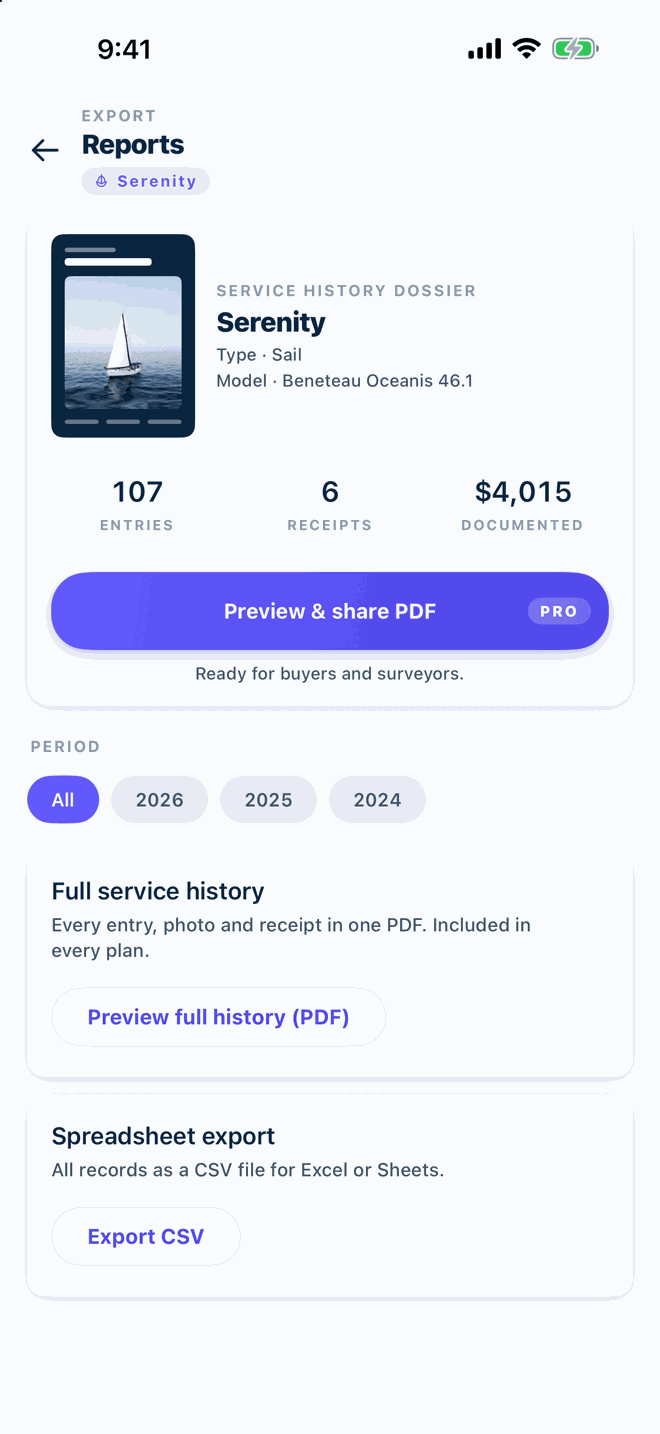
From the dashboard, open Reports via the Boat CV card or the yearly spending card. Choose the period at the top; All is the default.
-
Full service history as PDF
Tap Preview full history (PDF). Every entry, receipt and photo in one document, included in every plan.
Free -
Spreadsheet export as CSV
Tap Export CSV to get all records as a file for Excel or Sheets, including dates, engine hours, categories and amounts.
Free -
Boat CV
Tap Preview and share PDF under the Boat CV card. The vessel profile, engine service history, totals and receipts come out as one branded dossier. Add the HIN under Settings → Boat profile to make it more convincing.
Pro
Screenshot coming · S-09 -
Share or save
Every file opens in a preview with Share; send it by e-mail, save it to a cloud folder or print it.
Did it not work?
These answers cover the usual snags. If yours is not here, write to us with your platform, app version and a screenshot.